
Is a five-second latency spike during a traffic surge acceptable for your application? Cold starts are the silent performance killers of serverless architectures, yet most teams struggle to eliminate them without ballooning their cloud bill.
Anatomy of a cold start: The execution environment lifecycle
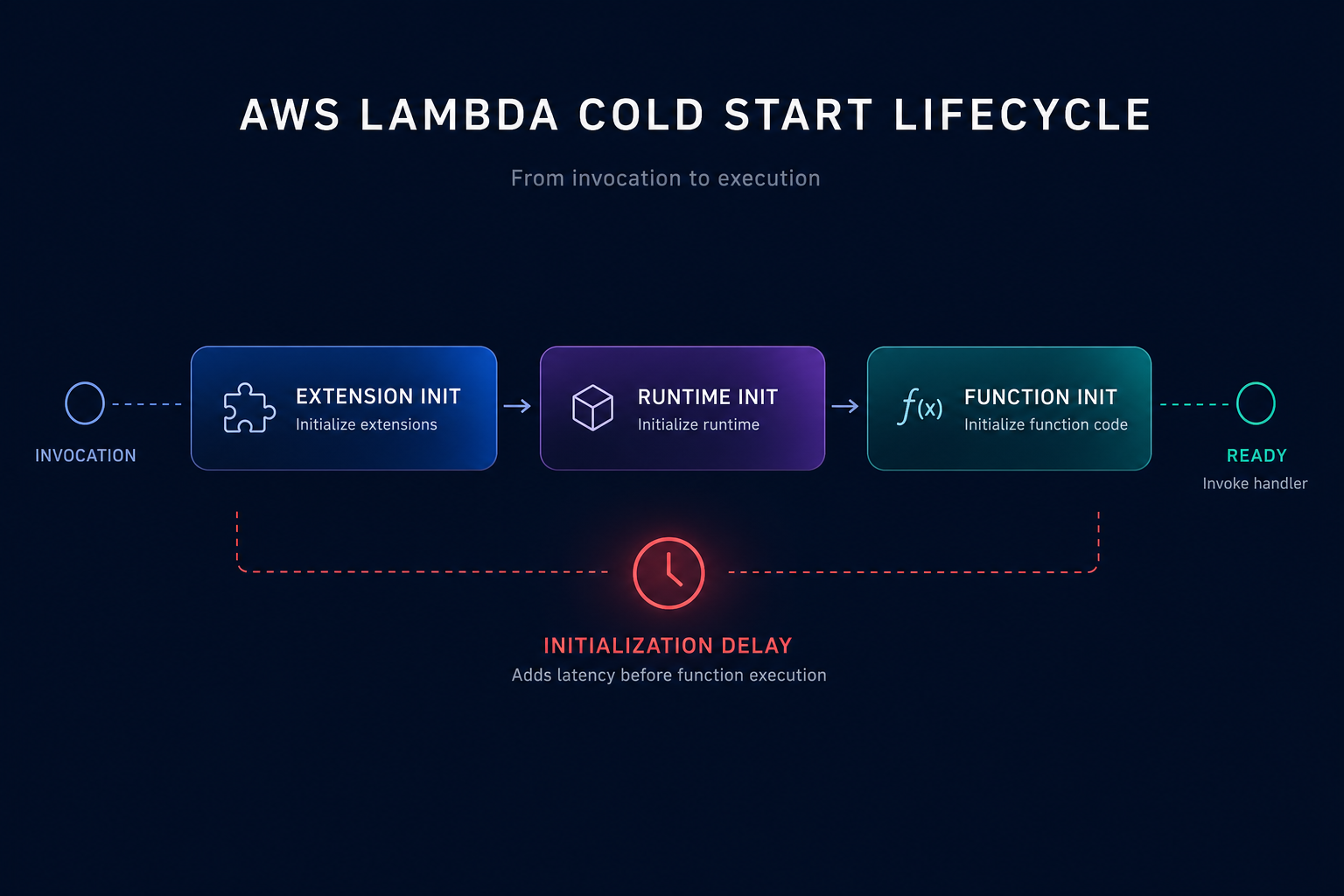
A cold start occurs when AWS Lambda must provision a new execution environment to handle an incoming request. This typically happens when you invoke your function for the first time, after a code update, or when the service scales up to meet increased demand. According to AWS documentation, the lifecycle consists of three distinct phases: Extension init, Runtime init, and Function init.
The “Init” phase is where the most significant delays occur. During this window, AWS must download your code, start a micro-VM, and initialize the runtime along with your static code. While general cloud latency reduction techniques usually focus on networking, Lambda latency is deeply tied to how much work you perform before the handler function even executes.
Runtime selection and package optimization
Your choice of programming language and how you bundle your code are the most influential factors in startup time. Compiled languages like Java and .NET generally suffer from significantly higher cold start penalties than interpreted runtimes like Node.js or Python. If your workload is sensitive to sub-second latency, choosing a lightweight runtime is the first step toward reducing serverless costs and improving responsiveness.
Beyond the runtime, deployment package size directly impacts the time AWS takes to download and unzip your code from S3. You can streamline this process by applying several technical best practices:
- Minimize dependencies by removing unused libraries and using tree-shaking to keep your ZIP file lean.
- Optimize Lambda layers carefully; while they help share code, adding too many layers or exceptionally large ones can increase mounting overhead during the initialization phase.
- Move heavy tasks like database connection pooling or SDK client instantiation outside the handler function to allow AWS to perform the work once during the init phase.
Tuning memory for initialization performance
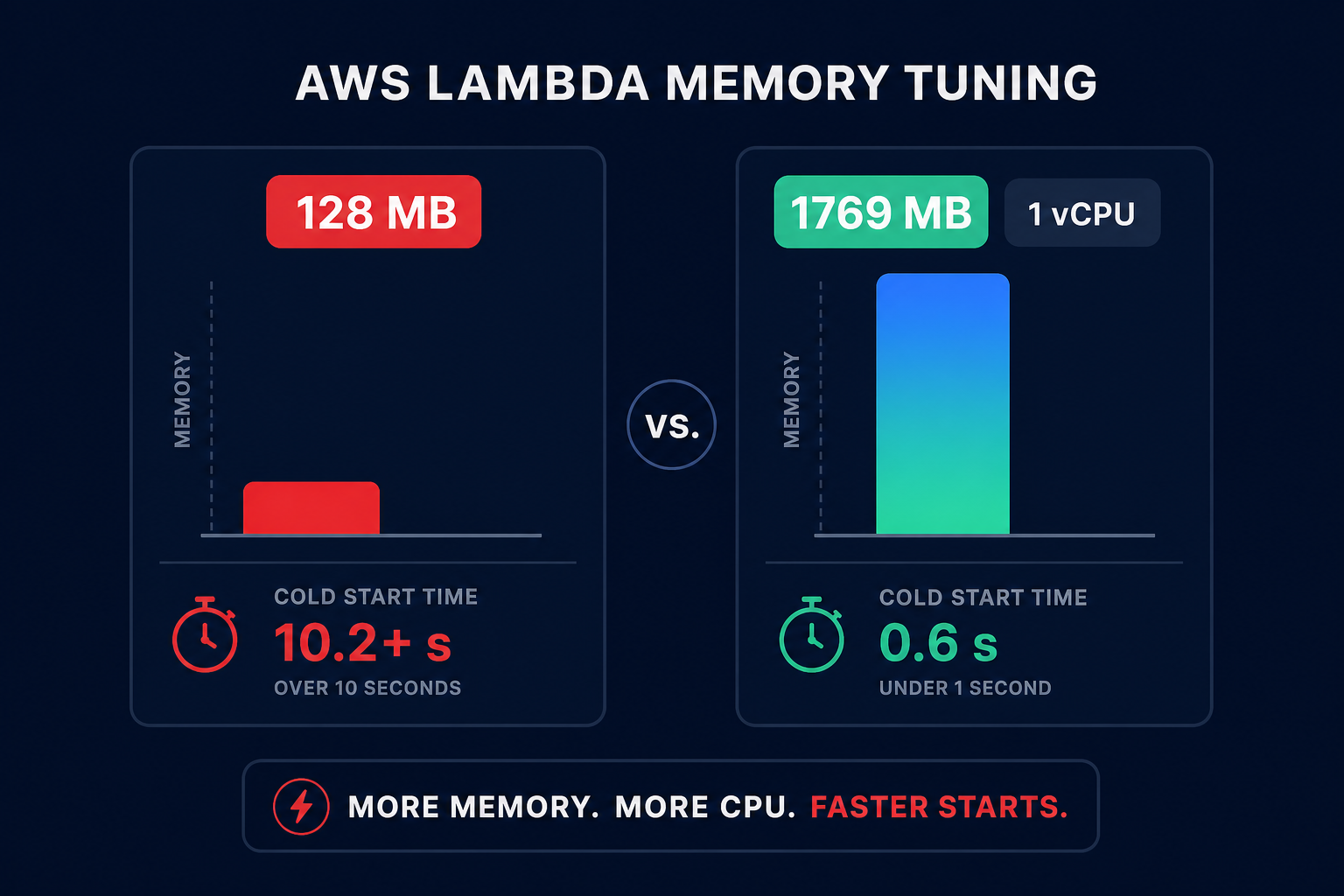
Many technical managers overlook the fact that AWS allocates CPU power linearly in proportion to the memory configured. When you increase the memory limit, you are effectively giving your function more compute runway to complete its initialization tasks faster.
A function with 128 MB of memory may struggle to initialize a heavy Java Spring Boot application, leading to cold starts exceeding 10 seconds. In contrast, optimizing Lambda memory to 1,769 MB provides the equivalent of one full vCPU, which can slash those initialization times significantly. Because you pay for the duration of the init phase for managed runtimes, higher memory can sometimes lead to lower total costs by reducing execution time. You can use the AWS Compute Optimizer guide to find the right balance between performance and spend for your specific functions.
Leveraging AWS Lambda SnapStart for Java
For organizations committed to the Java ecosystem, AWS Lambda SnapStart is a critical optimization tool. SnapStart reduces startup latency from several seconds to sub-second levels by taking a snapshot of a fully initialized execution environment. When the function is invoked, Lambda restores the snapshot instead of starting the initialization process from scratch.
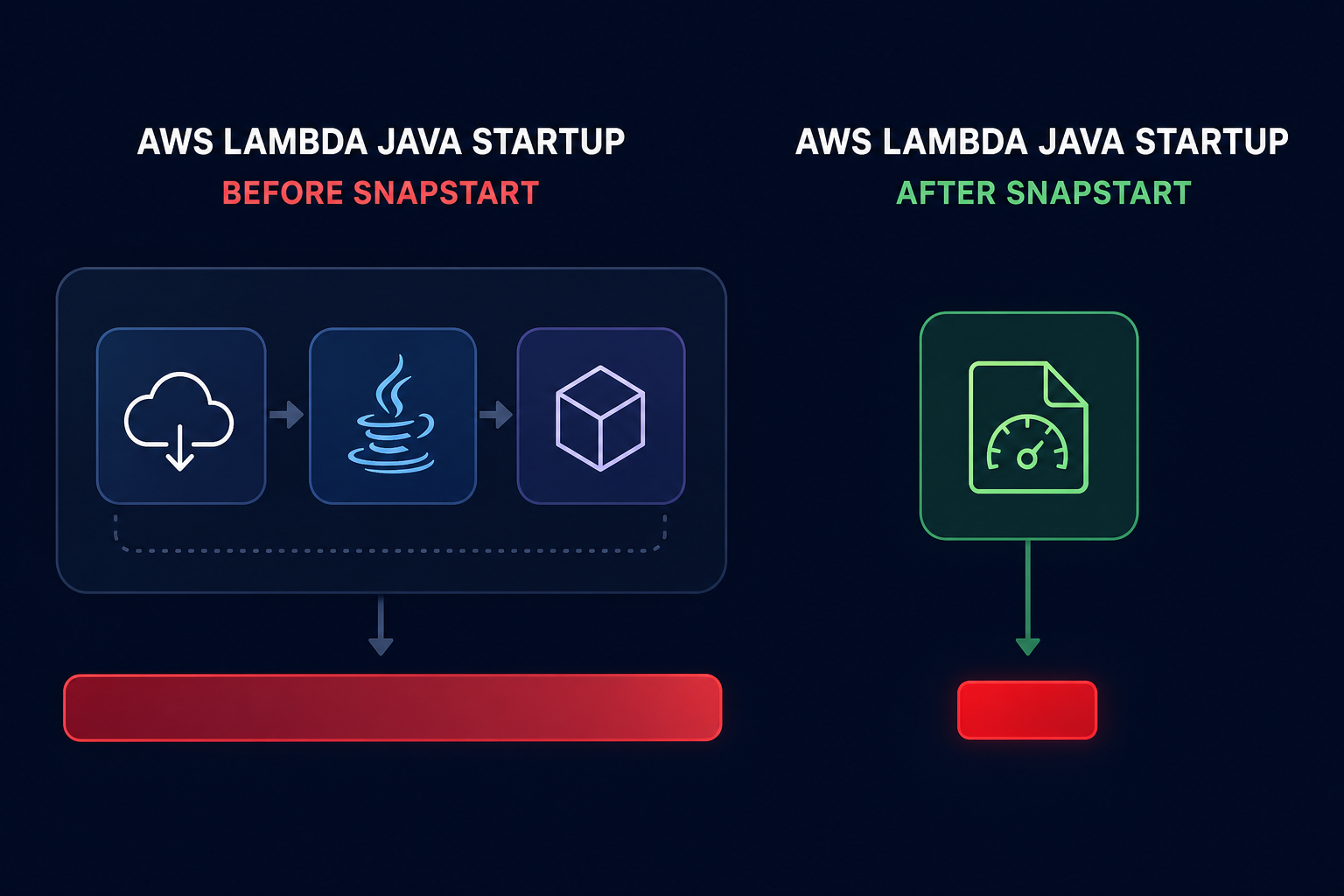
This “checkpoint and restore” approach eliminates the need for expensive priming strategies. However, you must be mindful of state uniqueness; any unique identifiers or secrets initialized during the build phase will be cloned across all restored environments. Implementing SnapStart is one of the most effective cloud application performance monitoring wins for Java-based microservices that require high-velocity scaling.
Balancing provisioned concurrency and cost
Provisioned concurrency is often considered the “nuclear option” for cold starts. It keeps a specified number of execution environments warm and ready to respond immediately. While it guarantees zero cold starts for the provisioned capacity, it also introduces a pay-for-idle model that can contradict the core promise of serverless efficiency.
You should reserve provisioned concurrency for highly predictable, latency-sensitive traffic spikes. For everything else, manual scaling of provisioned concurrency is often inefficient and expensive. This is where Hykell provides a strategic advantage by automating the underlying rate optimization. Instead of guessing how many warm functions you need, you can leverage automated observability to track usage patterns and right-size your commitments.
Networking and VPC optimizations
Historically, placing Lambda functions inside a VPC added significant cold start latency due to the creation of Elastic Network Interfaces (ENIs). AWS has since improved VPC networking by utilizing Hyperplane to provide NAT capabilities that drastically reduce this overhead.
Even with these infrastructure improvements, you should only place functions in a VPC if they need to access private resources like RDS instances or internal APIs. Avoiding unnecessary VPC configurations keeps your execution environment setup lean and reduces the surface area for potential application monitoring issues during high-traffic events.
Driving serverless efficiency with Hykell
Optimizing cold starts is not a “set and forget” task; it requires continuous monitoring of invocation patterns, memory utilization, and cost trade-offs. While AWS provides the raw tools, the engineering effort required to manually tune hundreds of functions often leads to over-provisioning and wasted budget.
Hykell takes the guesswork out of cloud performance. By operating on autopilot, Hykell identifies underutilized resources and automates rate optimization without compromising your application’s SLAs. Our platform helps you achieve up to 40% savings on AWS by ensuring your Lambda configurations are always aligned with actual demand.
If you are ready to see how much you could save while improving your serverless performance, use our AWS cost savings calculator to audit your environment today, or contact our experts for a detailed cost and performance audit.

