Are your AWS CloudTrail costs growing faster than your infrastructure? While the first copy of management events is free, misconfigured trails and redundant data logging can quietly inflate your monthly bill, leading to unexpected overspending on what should be a standard compliance tool.
Identifying the primary drivers of CloudTrail costs
To reduce your expenses, you must first understand the specific mechanics of AWS billing. CloudTrail pricing is categorized by the type of event and how it is delivered, with each charge appearing in AWS Cost Explorer under distinct usage types.
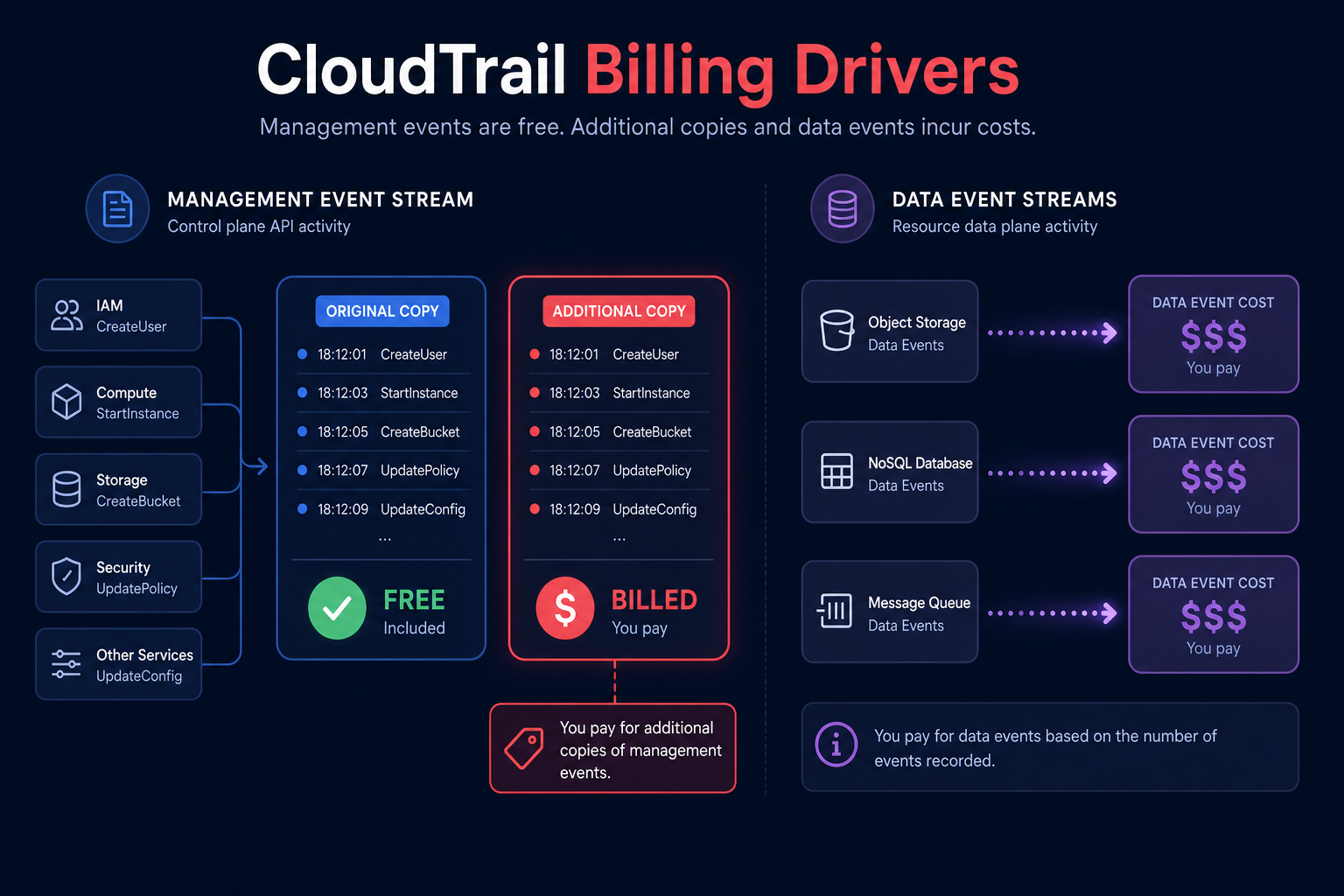
The most common driver is the delivery of management events. AWS provides the first copy of management events in each Region free of charge, but many organizations inadvertently pay for additional copies of management events by creating multiple trails that record the same data. For instance, if you maintain a multi-Region trail alongside a single-Region trail that both log management events, the single-Region trail delivers a second copy that incurs charges.
Data events and network activity events represent the second major cost driver. Unlike management events, these never fall under the free tier. Every delivery of a data event – such as Amazon S3 `GetObject` or AWS Lambda `Invoke` calls – incurs a cost. If you log every interaction with an S3 bucket containing millions of objects, your costs will spiral as quickly as an unoptimized Amazon CloudWatch Logs bill.
Eliminating duplicate logging across your organization
One of the quickest wins during an AWS cloud cost audit is identifying and removing duplicate trails. This inefficiency frequently occurs in AWS Organizations environments. If an organization-level trail is already collecting management events for the entire fleet, any individual member account that creates its own trail for those same events is charged for a redundant second copy.
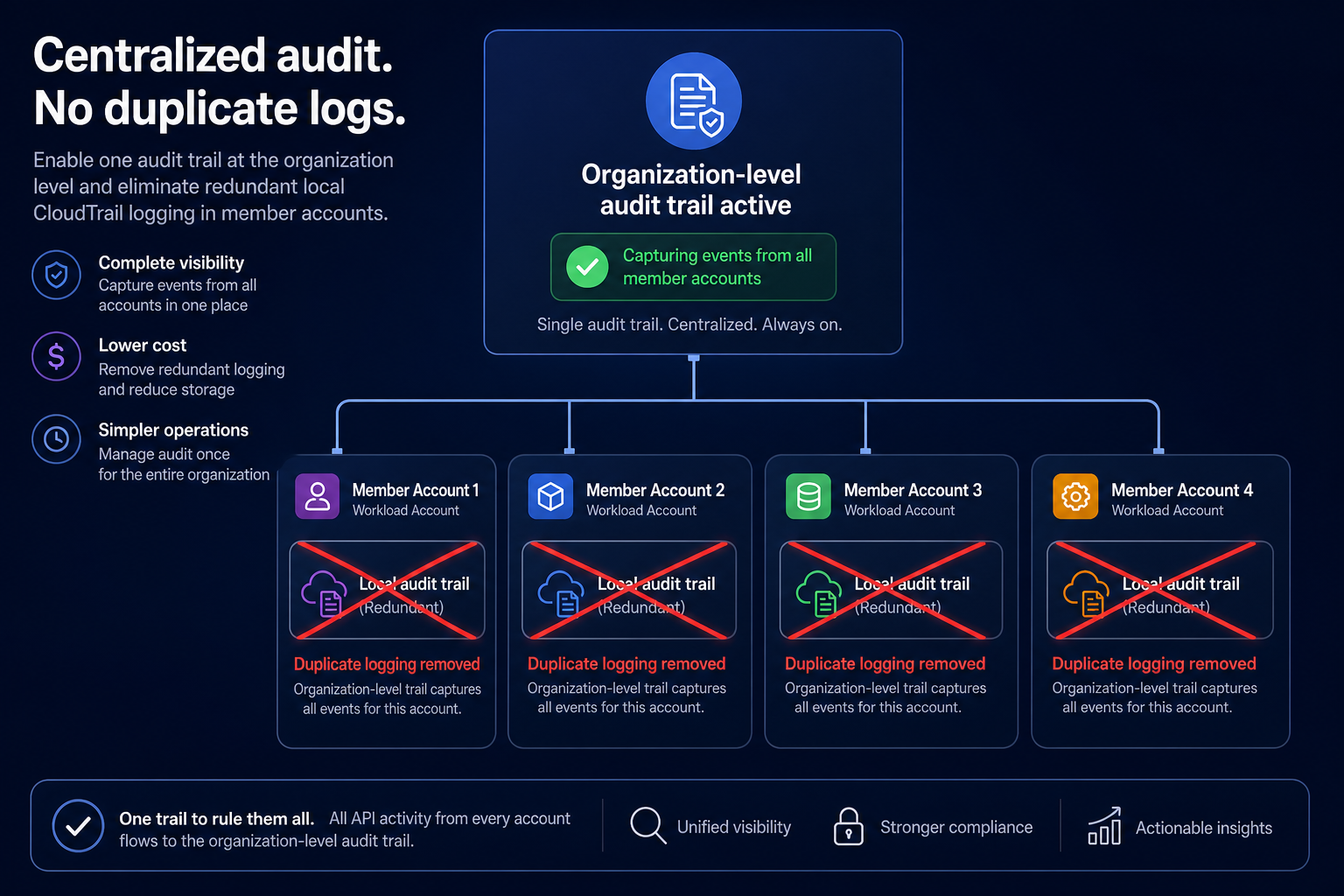
You should review your trails across all accounts and Regions to ensure you are not paying for the same data twice. If you find duplicates, disable management event logging on all but the primary trail. This allows you to maintain full audit visibility while utilizing the free tier for that first copy.
Using advanced event selectors for surgical logging
You do not need to log every single action to maintain a secure and compliant environment. Using advanced event selectors allows you to include or exclude specific data events based on fields like `eventName`, `resources.type`, and `resources.ARN`.
Instead of logging all S3 data events, you can use these selectors to log only high-value actions, such as `DeleteObject` or `PutBucketPolicy`. By narrowing your logging to specific operations and resources, you directly reduce the volume of billed events. This granular control is far more effective than basic event selectors, which lack the ability to filter data events with such precision.
This approach mirrors AWS Config cost optimization strategies, where selective resource recording prevents unnecessary data ingestion from inflating your monthly bill. By excluding low-value, high-volume events, you ensure your logging budget is spent on data that actually matters for security and troubleshooting.
Optimizing CloudTrail Lake ingestion and queries
CloudTrail Lake provides a managed data lake for storing and querying audit logs, but its costs are driven by ingestion volume and the amount of data scanned during queries. To keep these expenses under control, you must align your retention settings with your actual business and compliance needs.
AWS offers two primary pricing options for CloudTrail Lake:
- One-year extendable retention: This is generally more cost-effective if you ingest less than 25 TB of data per month and requires flexible retention up to 10 years.
- Seven-year retention: This option is better suited for high-volume workloads that require a fixed, long-term audit trail.
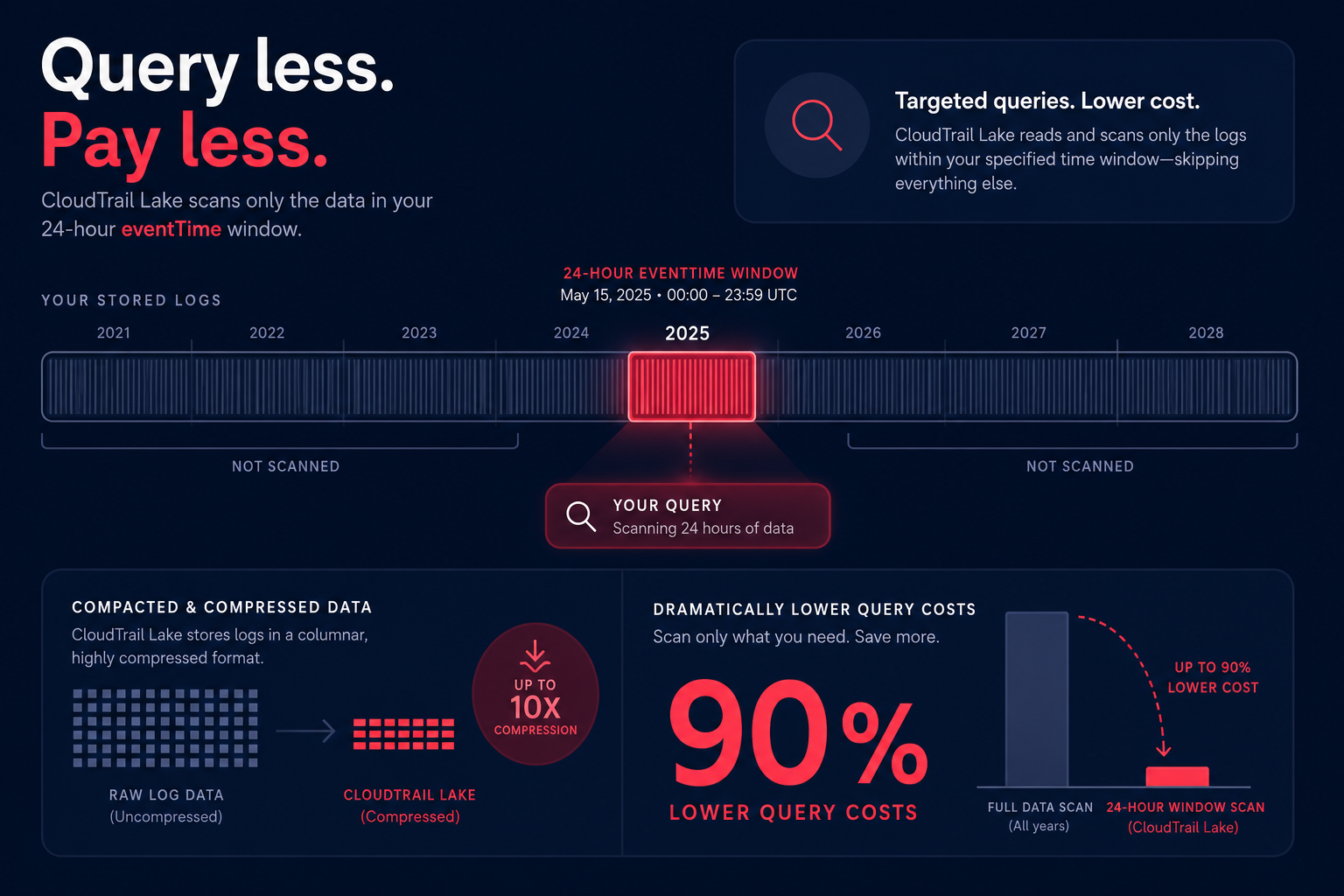
When running queries in CloudTrail Lake, you are billed based on the amount of compressed data scanned. You can significantly lower these costs by formatting your queries to include a specific `eventTime` range. Constraining the scan prevents the engine from searching through years of historical data when you only need insights from the last 24 hours.
Bridging the gap between monitoring and savings
Identifying these cost drivers is only the first step in conducting a cloud cost audit. While manual configuration changes can lower your CloudTrail spend, maintaining those savings in a dynamic AWS environment requires a closed-loop system that turns AWS cost monitoring into automated action.
At Hykell, we believe that performance and cost are two sides of the same coin. Our observability platform provides near real-time visibility into your AWS spend, allowing you to spot anomalies – like a runaway CloudTrail logging configuration – before they balloon into a budget crisis. We bridge the gap between FinOps insights and bottom-line impact by operating on autopilot to reduce your overall AWS bill by up to 40%.
Our AI-driven optimization ensures you get deep discounts across your entire infrastructure without the need for ongoing internal engineering effort. We only take a slice of what you save – if you don’t save, you don’t pay.
See how much you can save with the Hykell AWS cost calculator or contact our team to start a comprehensive audit of your AWS environment today.