
Are you tired of recommendations that clutter your console without saving you money? While AWS Compute Optimizer flags inefficiencies, it often creates more manual work than it solves, leaving engineers stuck in a loop of endless, unimplemented suggestions.
How AWS Compute Optimizer evaluates Lambda functions
AWS Compute Optimizer employs machine learning to analyze the trailing 14 days of invocation history for your functions. To generate any actionable insights, a function must have been invoked at least 50 times over that two-week period. The service primarily monitors CloudWatch metrics, specifically tracking invocation counts, execution duration, memory utilization, errors, and throttles to identify patterns of waste or risk.
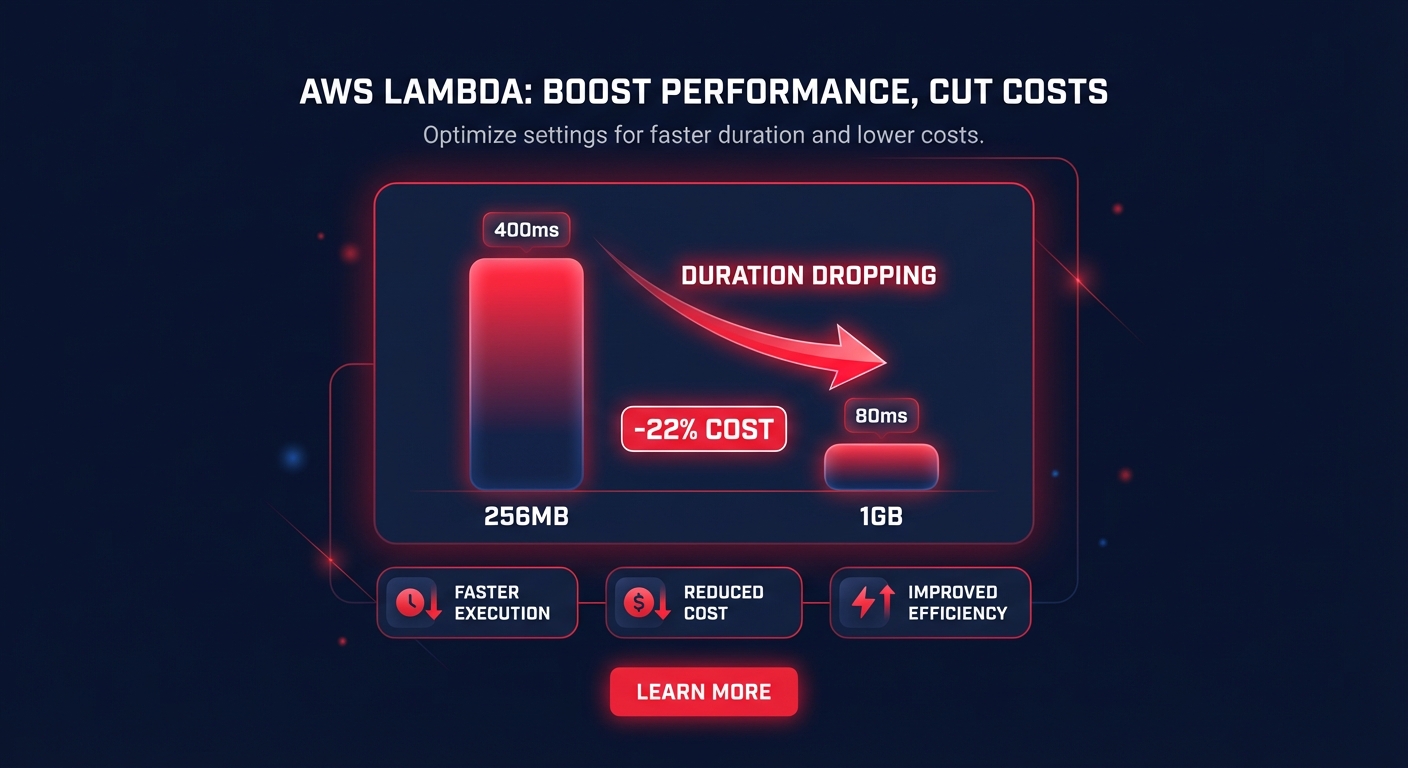
The tool categorizes your functions into three distinct buckets. Optimized functions represent the ideal state where memory allocation matches the workload requirements. Over-provisioned functions indicate you are paying for resources that are never fully utilized, while under-provisioned functions represent a performance risk where the function runs too close to its memory limits. The logic behind AWS Lambda memory optimization hinges on the linear relationship between memory and CPU power. By increasing memory, you can often reduce execution duration so significantly that the total cost per invocation decreases. For instance, an e-commerce order processing function moved from 256MB to 1GB can achieve a 22% cost reduction if the duration drops from 400ms to 80ms.
How to disable or remove AWS Compute Optimizer
If you are transitioning to a more automated cost optimization strategy, you may want to deactivate the service to reduce noise. Disabling the tool at the individual account level requires you to navigate to the AWS Compute Optimizer console and access the general settings menu. Within this interface, you can select the option to opt-out, which halts the daily generation of new recommendations. For teams that prefer command-line tools, the AWS CLI allows you to update your enrollment status to inactive with a single command.
When managing an entire environment through AWS Organizations, the process must be handled through the management account. A user with appropriate permissions can visit the organization tab within the settings menu to disable the service for all member accounts. This action revokes the service-linked role permissions and stops the ingestion of resource metrics across the entire organization. While this stops new analysis, it does not delete the historical CloudWatch data. If your organization has strict data retention policies, you may need to contact AWS Support to ensure that all utilization metadata used for machine learning models is fully purged.
Why manual recommendations fail to scale
The primary limitation of AWS Compute Optimizer is that it provides visibility without execution. It identifies that 20–30% of your resources are candidates for rightsizing but leaves the heavy lifting of updating configurations to your engineering team. In complex environments, this creates recommendation fatigue, where critical savings opportunities are buried under a mountain of manual tasks.
Furthermore, these recommendations rely on point-in-time snapshots of the last 14 days. If your traffic spikes or you release new code, the data used for last week’s recommendations may already be obsolete. Without continuous adjustment, your infrastructure remains static while your needs remain dynamic. To truly reduce spend, organizations must look beyond static lists and move toward automated AWS rightsizing that responds to utilization changes in real time.
Automating the fix with Hykell
Instead of spending engineering hours manually chasing console alerts, you can put your savings on autopilot. Hykell provides a comprehensive cloud cost audit that identifies inefficiencies and executes the necessary changes across your entire AWS footprint. While native tools show you what is happening, Hykell implements the optimizations for you, ensuring your resources always match your actual demand.
Our platform leverages advanced intelligence to maximize your efficiency without requiring code changes or manual approvals. We focus on several high-impact areas:
- Rate optimization strategies that use an algorithmic mix of AWS discounts like Savings Plans and Reserved Instances to boost your effective savings rate.
- Graviton migration analysis to identify workloads that can benefit from the 40% better price-performance of ARM-based processors as part of a broader AWS Lambda cost reduction strategy.
- Zero engineering lift solutions that work silently in the background, allowing your team to focus on innovation rather than infrastructure tuning.
Hykell operates on a performance-based pricing model, meaning we only take a percentage of the actual savings we generate. This ensures that you only pay when you see a tangible reduction in your cloud bill.
Stop managing endless lists of recommendations and start realizing actual savings. Connect your AWS account today for a free cost assessment and see how we can reduce your cloud spend by up to 40% automatically.

